


Affordable internet around the world
Your eSIM provider for big adventures. Instant activation and a stable connection anywhere on the planet.
Popular countries
What is an eSIM?
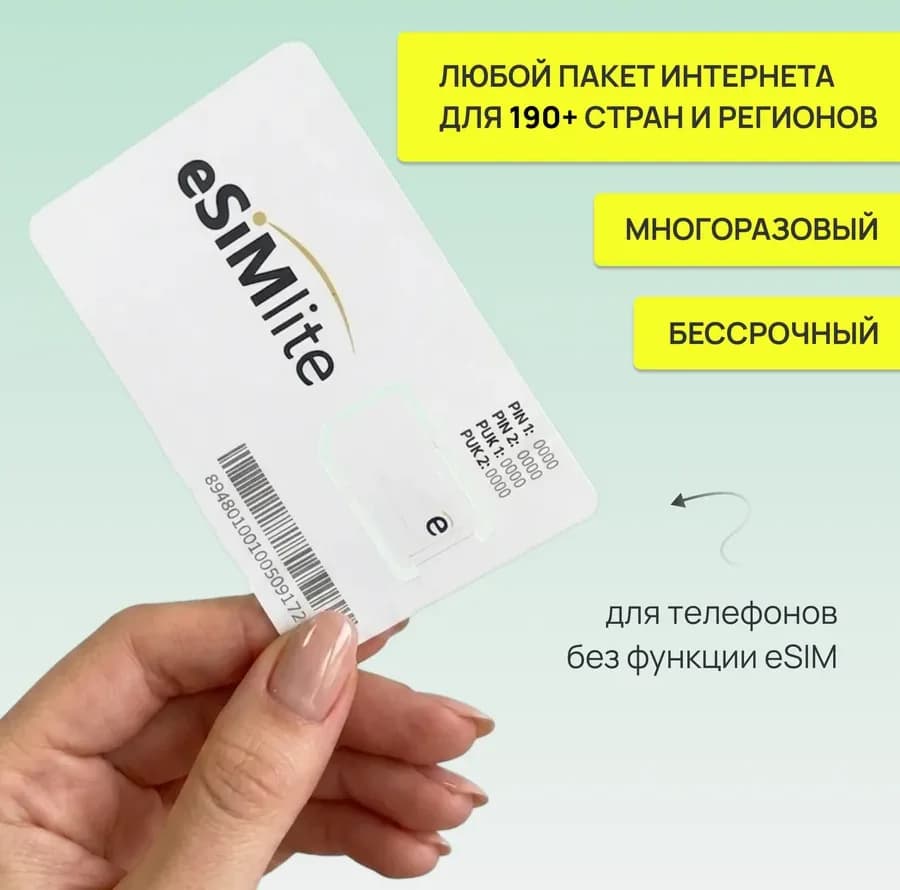
eSIM is a digital SIM card built into modern smartphones, or a unique physical card onto which you can install a mobile data package for any of 190+ countries and regions worldwide.
- Digital or physical eSIM for any phone
- Card payments: Russia – MIR; Belarus – all cards; Armenia, Georgia, Kazakhstan, Kyrgyzstan, Tajikistan, Turkey, Uzbekistan – VISA / MasterCard
- Secure payment (card data protection)
- Save on roaming
- Easy installation
- Easy top-up
- Transparent data usage
Check your device compatibility
iPhone
How to check whether your phone supports eSIM
Open "Settings" → "Cellular" → if there is an "Add eSIM" option, your phone supports eSIM.
How to find out whether your phone is not locked to one carrier and can use SIM/eSIM from different carriers?
Open "Settings" → "General" → "About" → if "Carrier Lock" says "No SIM restrictions", your phone supports eSIM.
Samsung
How to check whether your phone supports eSIM
Open "Settings" → "Connections" → "SIM manager" → if there is an "Add eSIM / Add mobile plan" option, your phone supports eSIM.
Xiaomi / Redmi
How to check whether your phone supports eSIM
Open "Settings" → "SIM cards & mobile networks" → if there is a "Use eSIM" option, your phone supports eSIM.
Honor
How to check whether your phone supports eSIM
Open "Settings" → "Mobile network" → "SIM management" → if there is an "Add eSIM" option, your phone supports eSIM.
Other
How to check whether your phone supports eSIM
Check your device's technical specifications or look in the settings for eSIM-related options, for example: "eSIM", "Add eSIM", "Manage eSIM", etc.
Order our SIM card
If your phone doesn't support eSIM technology, you can buy a SIM card from us and install any eSIM package on it.
**Delivery or pickup from the office of Gudzontrade LLC, 4/2 Amuratorskaya St., office 101, Minsk
How to buy and connect an eSIM
Check compatibility
Make sure your phone supports eSIM, or buy a physical eSIM
Choose a plan and pay
Pick the plan that suits you and pay online
Install the eSIM
After purchase, install and set up your eSIM in a couple of minutes using the guide
Ready to use
The eSIM activates automatically when you arrive in your destination country
Why eSIMlite
We built a service that makes mobile connectivity while traveling as simple, affordable and reliable as possible

A world without borders
Stay connected the moment you land. No local SIM cards.

Easy installation
Instant start. Pay online, install in a few minutes and go.

Plans that match your pace
Pay only for what you actually use. No hidden fees.

Always in touch
Support by phone, messengers and e-mail, 7 days a week.

Transparent control
Keep your data under control: track the balance in real time and top up.
Digital freedom
eSIMlite eSIMs work with all phones on any trip around the world.
FAQ
What is an eSIM?
An eSIM (in the context of the eSIMlite project) is a digital SIM card built into modern smartphones, or a unique physical card onto which you can install a mobile data package for any of 190+ countries and regions worldwide. The main advantages of an eSIM are instant connection and a great price.
How do I use an eSIM?
1. In the eSIMlite store, choose the country or region you need and pay for the eSIM. 2. Follow the instructions in the e-mail to install the eSIM in one of these ways: the “Install eSIM” button, a QR code, or manual entry of the activation code. After that, a new eSIM profile (a new SIM card) will appear in your phone settings. 3. For the new eSIM profile: - turn on data roaming; - select the eSIM as the main SIM card for mobile data. 4. The eSIM activates automatically when you arrive in your destination country. Buying and installing usually takes just a few minutes.
My phone doesn't support eSIM. How can I use a physical eSIM?
How to start using a physical eSIM: 1. Activate the physical eSIM and purchase the FIRST data package HERE >>> 2. After you buy a package, you will get instructions. You need to: a. Turn on data roaming; b. Select the SIM card (physical eSIM) as the main one for mobile data. 3. Internet will be available automatically upon arrival in your destination country. At that moment the usage time or data countdown begins, depending on the package you bought. We recommend installing it at home a few days before the trip. 4. Check your remaining data and buy SUBSEQUENT packages on the “My eSIMs” page. This way, the next package for the same country activates automatically once the previous one is used up. A package for another country (if you need to visit several countries) activates automatically when you arrive in the new country.
When does the plan I purchased start?
We recommend buying and installing the eSIM a few days before your trip. The plan's validity period starts from the moment you enter the destination country (data is used up or time counts down, depending on the package).
Are there plans for the country I'm interested in?
Yes, you can use the search on this page and choose a suitable data package for more than 190 countries and regions. For example, if you are visiting several countries, it is better to consider regional offers.
Which phones support eSIM?
Many modern smartphones support eSIM. Here are the main brands and models: Apple iPhone: All models starting from iPhone XS (2018), including the latest iPhone 17. Samsung Galaxy: Flagship series (S20-S25, Z Fold/Flip, Note20) and some mid-range models (A54, A55, A56). Google Pixel: All models starting from Pixel 2, including the latest Pixel 9 and Pixel 9 Pro. Xiaomi: 12T Pro, 13, 14, 15 series, as well as Redmi Note 13/14 Pro. Huawei: P40, P40 Pro, Mate 40 Pro. Other brands: Sony Xperia, Motorola (Razr, Edge, Moto G), OnePlus (11/12/13), OPPO (Find X) and Vivo. Important: eSIM support may depend on the region the device was sold in. Phones released for China and Hong Kong often don't have this feature.
Can I use a regular SIM card and an eSIM at the same time?
Yes. If your phone supports eSIM technology, you can use a regular physical SIM card and an eSIM at the same time. Only one card can be used for mobile data. In your phone settings you choose which card (physical or eSIM) is used for data.
Is it true that an eSIM is more cost-effective for travel?
Yes, it is. For travel, an eSIM is in most cases significantly cheaper and more convenient than a traditional physical SIM card or roaming.
How do I check my remaining data and find out in advance when it runs out?
You can always check your remaining data in your account via the menu: "My eSIMs". This applies to fixed-data offers. For most eSIM packages you will receive SMS notifications when 70% and 90% of the available data has been used.
Can I use an eSIM for calls and text messages (SMS)?
No, our cards provide internet only. You can't use them for regular calls or SMS because the card simply has no phone number. But you can always use any messenger such as Telegram, WhatsApp, Viber, etc. to communicate.
How many eSIM profiles can I store on my phone?
The number of eSIM profiles a phone can store depends on the model and manufacturer. In most modern smartphones it ranges from 5 to 20 or more.
How do I check that the eSIM is working and not roaming from my carrier?
The most reliable way, which protects you 100%, is to remove your physical SIM card (we recommend this). It is also very easy to check that traffic goes through the travel eSIM and not through your home carrier's roaming - just look at your phone settings. Here is a short guide for iPhone and Android: Step 1: Turn off roaming on your home SIM card This is the most reliable way to protect yourself from accidental charges. Do it before arriving in the country or right after landing, before your phone connects to foreign networks. iPhone: Settings → Cellular → select your regular (physical) SIM card → Cellular Data Options → turn off the “Data Roaming” switch. Android: The path may differ slightly, but the general principle is: Settings → Connections (or Network & internet) → Mobile networks → select your home SIM → turn off “Data roaming”. After that, your physical SIM card will work only in the home network and won't be able to connect to foreign towers. Step 2: Make sure the eSIM is selected for internet Now you need to check which card is used for data by default. iPhone: Settings → Cellular → in the “Cellular Data” section, see which plan (SIM card) is selected. It should be the name of your travel eSIM. Tip: To avoid accidentally switching to your home SIM, in the same menu you can turn off “Allow Mobile Data Switching”. Android (general method): Settings → Network & internet (or Connections) → “SIM manager” (or “Mobile networks”). In the “Mobile data” section (or “Preferred SIM for internet”) it will show which card is active - physical or eSIM. For Samsung: Settings → Connections → “SIM manager” → in the “Preferred SIM card” block, look at the “Mobile data” item. Step 3: Visual check (the quickest way) Usually the cellular network icon in the status bar (where the signal strength and carrier name are shown) tells you which SIM card is active for internet. A small letter or label is often shown next to the signal bars: Primary - often your physical SIM. Secondary - usually the travel eSIM. It may also be just a number (1 or 2) or a color marker that you set during setup. Bottom line: If you turned off roaming on the physical SIM and selected the eSIM as the main data source, you are safe and using the internet at a great rate.
How do I switch between different eSIM profiles?
Switching between eSIM profiles is done in your smartphone settings. You can do it at any time, and you don't need to swap physical cards. Here is a general guide for iPhone and Android: 1. How to switch the active profile for internet This is the most common case, for example when you arrive in another country and want traffic to go through the local eSIM rather than your home SIM. iPhone: Settings -> Cellular -> select the plan you need (eSIM) -> turn on the "Turn On This Line" switch or set it as the main one for data. Android: Settings -> Connections (or Network & internet) -> SIM manager -> under "Mobile data" select the eSIM you need. 2. How to choose which SIM to call from You can set your phone to always ask which number to use for a call, or assign a specific SIM to each contact. Settings path: The same SIM management section, the "Voice calls" or "SIM for calls" item. 3. How to temporarily turn off an unneeded profile If you don't want to delete a profile but need it to be inactive (for example, so your home number's plan isn't used up in roaming): Go to the list of eSIM profiles and simply turn off the "Turn On This Line" toggle (on iPhone) or uncheck the box (on Android). Important: Only two profiles can work at the same time (for example, a physical SIM + one eSIM, or two eSIMs), but you can switch between saved ones endlessly.
Can I transfer an eSIM to another phone?
Due to technical specifics, an eSIM can only be used on the phone where it was originally installed. If you changed your phone, a previously installed eSIM will not work on the new device. In this case you need to buy a new eSIM. A physical eSIM can be moved between different phones.
What should I do if the eSIM install button or QR code doesn't work?
If an error appears when you tap the “Install eSIM” button in the instructions or scan the QR code, check the following: Does your phone support eSIM? Make sure your device is compatible with eSIM technology. Was the eSIM already installed earlier? If you have already started the activation process, the eSIM may have been installed automatically in the background. Check for a new eSIM in the SIM manager / mobile network settings. Wi-Fi connection. If your phone is connected to a public Wi-Fi network (for example, in a hotel or airport), the device may consider it unsafe. In this case: - connect to another Wi-Fi network or use mobile data; - restart your phone; - try installing the eSIM again. Use the third installation method from the instructions – “Enter details manually”. If these recommendations didn't solve the problem, contact our support team.
Is there technical support?
Yes, our support team works 24/7 and is ready to help with eSIM activation, device setup and any technical questions.
Can I use an eSIM to share internet with other devices (tethering)?
Most plans support tethering (internet sharing). However, some unlimited plans may have restrictions, for example a data limit for sharing (up to 30 GB). Current information about tethering support and possible restrictions is given in each plan's description.
What our customers say
Real customer reviews from Wildberries and Ozon
- AnnaSeptember 16Wildberries
Thanks for the great internet in Beijing. We looked at local SIM cards at the airport, and they were much more expensive. With the esimlite card, Telegram, TikTok and Google worked for me without a VPN.
- LarisaSeptember 17Wildberries
The 10-day unlimited package worked perfectly in Turkey, the internet was shared with 5 people and the speed didn't drop … I recommend it to everyone.
- ViktoriaOctober 02Wildberries
Thank you, the installation was easy and simple. As soon as I crossed the EU border the internet appeared right away. I visited several countries and had internet everywhere.
- Alexey M.August 20, 2026Ozon
Everything works as it should.
- Evgeny Sh.August 24, 2026Ozon
Speed in Turkey on the unlimited plan is 80 Mbps. 4G signal. Tethering works.
- Oksana M.October 11, 2026Ozon
The cheapest eSIM adapter of all I checked. I'm following the instructions. I contacted support and they replied instantly. I hope it won't let me down on my trip. I recommend it to everyone.
Have questions? Contact us
We'll help you choose a plan, install your eSIM and with any question — message us on a messenger or by e-mail at a time that suits you.
Phone: 10:00–19:00 Moscow time (MSK)
Messengers and e-mail: 9:00–20:00 Moscow time (MSK)